

dTwin use cases and industries
Digital twin workflows for real estate, industry, infrastructure and construction.
Nemetschek dTwin helps teams connect BIM, reality capture, IoT data, dashboards, reports and asset information so built assets can be viewed, understood and managed with greater context across different industries and lifecycle stages.
Commercial real estate · Industrial buildings · Infrastructure · Design & construction


Work with us with confidence. Professional service and software subscriptions delivered by SIMBIM as an ISO 9001 & ISO 19650 certified organisation — covering proposal, licence delivery, onboarding and support, aligned with the principles of ISO 19650.
View SIMBIM certificationsWhat dTwin is used for
Built-asset data becomes useful when teams can see it, connect it and act on it.
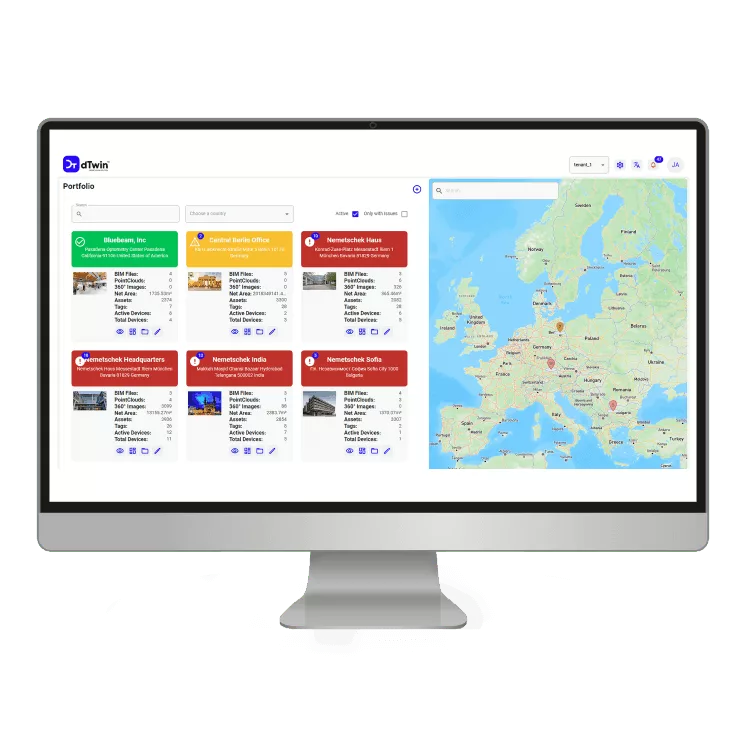
dTwin use cases centre on connecting building and infrastructure information into a visual digital twin environment. Teams can use dTwin to bring together BIM context, reality capture, point clouds, 360° images, IoT data, dashboards, reports and asset information where the required data and integrations are available.
Visual asset access
dTwin can help teams visit a building or asset visually, navigate it and find the information they need without travelling on site, where models and reality capture are configured.
BIM and operational context
dTwin can link federated BIM models with operational data so design intent and as-operated reality sit in the same view, where data is available.
Reality capture and site visibility
Point clouds, 360° panoramas and points of interest can be combined with BIM context to give teams a current view of the asset, depending on capture and integration scope.
IoT-linked monitoring
dTwin can connect to sensor streams and operational systems so live signals are visible in the building context, where IoT, BMS or FM integrations are configured.
Dashboards and reporting
dTwin can support dashboards, reports and search across asset and operational data, depending on data quality and dashboard scope.
Asset and lifecycle information
dTwin can carry asset information and lifecycle context from design and construction through handover into operations, where information requirements are defined.
Industry use cases
How dTwin can support different built-asset sectors.
The verified use cases below come from Nemetschek's industry pages and are framed with SIMBIM-safe language. dTwin can support these workflows where the underlying data sources, integrations and operational workflows are configured — not as guaranteed outcomes.
Commercial real estate
Commercial real estate teams need better visibility into building usage, tenant experience, energy consumption, maintenance conditions and portfolio performance — across offices, retail and mixed-use buildings.
How dTwin can support this sector — dTwin can support visibility, analysis and operational decision-making for real-estate portfolios where building data, IoT streams, dashboards and asset information are available.
SIMBIM evaluation focus — SIMBIM helps real-estate teams assess which data sources, building systems, dashboards and operational workflows are ready for a dTwin evaluation, and what needs to be scoped before implementation.
Guardrail: No guarantee of cost reduction, tenant satisfaction, energy reduction, sustainability performance, safety/security improvement or revenue improvement.

Office Buildings
- Space Utilization — can support, where configured
- Tenant Experience — can support, where configured
- Energy Management — can support, where configured
- Predictive Maintenance — can support, where configured
- Safety and Security — can support, where configured
- Sustainability — can support, where configured

Retail Buildings
- Store Layout Optimization — can support, where configured
- Inventory Management — can support, where configured
- Supply Chain Management — can support, where configured
- Predictive Maintenance — can support, where configured
- Personalized Marketing — can support, where configured
Industrial buildings
Industrial sites need visibility into production environments, storage and distribution spaces, equipment, energy use, maintenance conditions, inventory movement and operational risk.
How dTwin can support this sector — dTwin can support industrial building visibility, monitoring and planning where relevant data sources, IoT streams, assets and integrations are configured.
SIMBIM evaluation focus — SIMBIM helps industrial teams identify which physical assets, IoT signals, operational data and dashboards are needed before assuming dTwin can support the use case.
Guardrail: No guarantee of productivity gains, safety improvement, cost reduction, supply-chain improvement, energy reduction or downtime reduction.


Manufacturing Buildings
- Remote Monitoring & Control — can support, where configured
- Energy Optimization — can support, where configured
- Digital Twin Simulation — can support, where configured
- Predictive Maintenance — can support, where configured
- Worker Safety Enhancements — can support, where configured

Storage and Distribution Buildings
- Predictive Maintenance — can support, where configured
- Real-Time Inventory Tracking — can support, where configured
- Supply Chain Simulation — can support, where configured
- Warehouse Layout Optimization — can support, where configured
- Energy Efficiency Monitoring — can support, where configured
Infrastructure
Infrastructure owners and operators need visibility across complex assets such as airports, seaports and other large operational environments — covering buildings, equipment, flow and safety context.
How dTwin can support this sector — dTwin can support infrastructure visibility, monitoring and scenario review where the necessary models, scans, operational data, sensors and workflows are configured.
SIMBIM evaluation focus — SIMBIM helps infrastructure teams define the asset scope, operational data sources, dashboard needs and integration assumptions before implementation.
Guardrail: No guarantee of safety, security, passenger-flow improvement, emergency-response outcomes, supply-chain performance, environmental performance or regulatory compliance.


Airports
- Real-Time Monitoring — can support, where configured
- Passenger Experience Optimization — can support, where configured
- Predictive Maintenance — can support, where configured
- Energy Management — can support, where configured
- Emergency Response Planning — can support, where configured

Seaports
- Port Operations Optimization — can support, where configured
- Supply Chain Visibility — can support, where configured
- Energy Management — can support, where configured
- Predictive Maintenance — can support, where configured
- Safety and Security — can support, where configured
- Environmental Impact Monitoring — can support, where configured
Design and construction
Design and construction teams can use digital twin workflows to connect design information, construction progress, reality capture, collaboration and handover context.
How dTwin can support this sector — dTwin can support design and construction workflows where BIM, drawings, reality capture, issue data, documentation and construction information are available and connected.
SIMBIM evaluation focus — SIMBIM helps project teams define whether the priority is design coordination, site visibility, quality review, handover information or operational data continuity.
Guardrail: No guarantee of design quality, approval, compliance, programme improvement, budget reduction, site safety, quality-control outcome or handover completeness.


Design Phase
- Design Simulation — can support, where configured
- Virtual Prototyping — can support, where configured
- Collaboration — can support, where configured
- Regulatory Compliance — can support, where configured
- Sustainability Analysis — can support, where configured

Construction Phase
- Construction Site Management — can support, where configured
- Quality Control — can support, where configured
- Sustainability and Energy Efficiency — can support, where configured
- Safety and Risk Management — can support, where configured
- Resource Optimization — can support, where configured
Cross-industry capabilities
The same digital twin capabilities support different sectors.
Nemetschek's use-cases page lists six horizontal dTwin capabilities. SIMBIM frames them as capabilities the platform can support — never as guaranteed outcomes — and treats availability as dependent on data, integrations and configuration.

AEC/O integrations
dTwin can help connect design, construction and operations information where the required systems, formats and integrations are available.

IoT data streams
dTwin can link sensor streams and operational data to visual building context where devices, data feeds and integration scope are configured.

Data harmonisation and linkage
dTwin can help organise data from different sources into connected building context so teams can navigate information more easily.

Asset management
dTwin can support asset visibility and operational review where asset registers, models and related data are available.

Localisation and navigation
dTwin can support navigation, location context and spatial understanding where the necessary models, scans or 360° imagery are available.

Realtime notifications and insights
dTwin can support notifications, alerts and insights where live data streams, rules and operational workflows are configured.
Lifecycle workflows
Use cases across reality capture, design, construction and operations.
The four-stage lifecycle structure below comes from Nemetschek's solutions page. Sub-items are rendered only where they are explicitly verified in the source documentation, and every item is framed as can support / where configured.
Reality Capture
Build a current visual baseline of the asset using capture data.
- Point Clouds
- 360 Panoramas
- Visualization
- Points of Interests
- Collaboration
- Advanced toolsets
- GIS integration
Design
Bring BIM and design information together with context and review tools.
- Processing
- Models federation
- Model elements classification
- Comparison and documentation
- Dashboards and insights
- Extensive search
- Reality captures meets BIM
- Integration
- Specialized tools
Construction
Connect documents, issues, models and verification through to handover.
- Document Management
- Model and issues collaboration
- As-built verification
- Handover
- Dashboards
Operations
Use the twin in day-to-day operations where live data and asset information are available.
- IoT Streams
- Real-time insights
- Up-to-date & reliable information
- Assets management
- Navigation and localization
- Connecting the ecosystem
- Data-driven decisions
- Remote inspection
Lifecycle continuity is not automatic. Real value depends on defined information requirements, data quality, integrations, dashboards and operational workflow ownership.
Use-case matrix
Match industry needs to dTwin workflows.
A side-by-side view of the four sectors, what they typically need, where dTwin can fit, what data is required, what SIMBIM checks first and what we will not guarantee.
| Industry | Typical asset context | Main dTwin use cases | Data sources needed | SIMBIM evaluation question | Guardrail |
|---|---|---|---|---|---|
| Commercial real estate | Offices, retail, mixed-use buildings, multi-asset portfolios. | Space utilisation, tenant-experience context, energy management, predictive maintenance, store layout, inventory and supply-chain context. | BIM, floor plans, BMS, FM/CAFM, energy meters, sensors, dashboards. | Which buildings and systems are ready to be connected first? | No savings, occupancy or experience guarantees. |
| Industrial buildings | Manufacturing plants, warehouses, distribution centres. | Remote monitoring, energy optimisation, digital twin simulation, predictive maintenance, real-time inventory, warehouse layout. | BIM/CAD, equipment data, MES/SCADA, WMS/ERP, IoT sensors. | Which operational data sources exist and who owns the workflow? | No productivity, safety, downtime or energy guarantees. |
| Infrastructure | Airports, seaports, large operational facilities. | Real-time monitoring, passenger or port operations, predictive maintenance, energy management, emergency-response planning, environmental monitoring. | BIM, GIS, operational systems, sensors, security and safety data. | What is the operational scope and integration boundary? | No compliance, safety, security or efficiency guarantees. |
| Design & construction | Projects in design, on-site construction and handover stages. | Design simulation, virtual prototyping, collaboration, site management, quality control, resource optimisation, handover preparation. | BIM, drawings, point clouds, 360 photos, issues, documents, schedules. | Is the priority coordination, site visibility, quality or handover continuity? | No schedule, budget, compliance or quality guarantees. |
Benefits, with implementation reality
dTwin can create value only when data, scope and workflows are clear.
Potential benefits dTwin can support
- Improved visibility into built assets
- Easier access to spatial and asset data
- Better context for operational decisions
- Stronger connection between BIM and operations
- Improved monitoring where IoT data exists
- Better dashboard and reporting context
- Stronger handover and lifecycle information continuity
- More informed digital twin strategy
What must be true first
- Source data exists and is accessible
- BIM models, scans, documents or IoT streams are usable
- Integrations are scoped
- Data ownership is clear
- Operational workflows are defined
- Dashboards have meaningful KPIs
- Teams know who will act on insights
- Commercial and technical scope is confirmed
Why SIMBIM
Why evaluate dTwin use cases through SIMBIM?
SIMBIM is a BIM-specialist consultancy and proposal-led software provider. We help customers qualify the use case, assess data readiness, scope integrations and define onboarding before any commercial commitment.
Use-case qualification
SIMBIM helps identify whether the real need is real-estate visibility, industrial monitoring, infrastructure operations, construction coordination, lifecycle handover or broader digital twin strategy.
Data-source readiness review
SIMBIM helps identify which BIM models, scans, photos, IoT streams, documents, asset registers and FM systems are available before assuming a dTwin workflow is ready.
Integration and dashboard scoping
SIMBIM helps clarify which integrations, dashboards, rules, alerts or operational workflows need to be scoped separately.
Proposal-led commercial process
SIMBIM confirms scope, assumptions, onboarding needs and commercial terms through a written proposal instead of immediate checkout.
BIM information management expertise
SIMBIM connects dTwin evaluation to BIM information management, model data, asset information, handover needs and lifecycle information strategy.
Support beyond purchase
SIMBIM provides a support path for workflow questions, technical guidance and adoption issues after purchase.
Commercial path
Use-case scope first. Proposal second.
dTwin use cases depend on asset type, data sources, integrations, dashboards, IoT availability, operational workflows, onboarding and support needs. SIMBIM confirms the commercial path through a written proposal rather than immediate checkout.
- Final terms confirmed in a SIMBIM proposal.
- No immediate checkout.
- No public price publication unless SIMBIM explicitly approves.
- Availability varies by licence conditions, product version, data-source scope, integrations, deployment requirements and region.
- IoT, API, dashboard, CAFM, energy-analysis or custom integration work may require separate scoping.
- Source data quality and readiness affect implementation effort.
- Industry use cases require operational workflow ownership.
SIMBIM process
From use-case idea to scoped digital twin adoption.
- 01
Identify the industry context
Confirm whether the customer need relates to commercial real estate, industrial buildings, infrastructure, design/construction or a cross-industry asset workflow.
- 02
Define the real use case
Clarify whether the objective is visual access, monitoring, asset management, dashboard reporting, reality capture, handover, IoT integration or operational decision support.
- 03
Review available data
Identify available BIM models, point clouds, 360 images, GIS context, IoT streams, documents, asset registers and FM or CAFM systems.
- 04
Assess data and integration readiness
Review whether data sources are accessible, usable, current and ready to connect to a dTwin workflow.
- 05
Confirm dTwin fit and scope
SIMBIM reviews whether dTwin is the right platform path and what implementation assumptions need to be clarified before proposal.
- 06
Issue proposal
SIMBIM confirms commercial terms, scope assumptions, onboarding needs and support expectations in a written proposal.
- 07
Support onboarding and adoption
SIMBIM supports workflow orientation, technical guidance and adoption follow-up according to the agreed scope.
FAQ
Frequently asked questions.
Ready to qualify your dTwin use case?
Tell SIMBIM whether your priority is commercial real estate, industrial buildings, infrastructure, design and construction, IoT monitoring, reality capture, asset information or a broader digital twin strategy. We will help you evaluate dTwin fit, data readiness and proposal scope.