
Articles in this section
- How to Create an Archicad Template and What It Should Contain?
- How to Reallocate Bluebeam Subscriptions Between Accounts?
- How to Subscribe to Software with SIMBIM
- Archicad Files Don't Show the Correct Icon on Windows
- Why Can't I Assign a Licence If the User Shows Up as a Guest?
- How to Reset Your Bluebeam ID (BBID) Password?
- How to Transfer Markups to Another Document?
- How to Manage My Bluebeam Subscriptions?
- How to Change the Administrator of a Graphisoft ID Company?
- How to Use Bluebeam Revu on Mac Computers?
Archicad Basics - Selecting Elements in Archicad
Reading time: 5 min.
Archicad is a powerful tool for architects and designers, and one of the fundamental aspects of working efficiently is element selection. This article will guide you through the basic concepts of selection in Archicad, helping you master this essential skill.
Arrow Tool
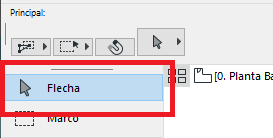
The Arrow tool is your main resource for selecting elements in Archicad. When activated, you will see several options in the Info Box that let you change the selection methods and geometry methods.
Selecting Elements
Selecting elements in Archicad is simple:
-
Select a single element: Position yourself over the element you want to select and left-click.
-
Add elements to the selection: Hold down the Shift key while clicking the additional elements you want to include in your selection.
-
Exclude elements from the selection: If you want to exclude an element from your selection, click the already-selected elements while holding down the Shift key.
Selection Options
In certain situations, such as at connection points, adjacent elements, or where elements overlap, you may find several selection options. To cycle through these options, simply press the Tab key.
Practical Tips
-
Use the Info Box: Familiarise yourself with the options available in the Info Box to optimise your selection process.
-
Try different geometry methods: Experiment with the geometry methods to find the one that best suits your needs.
-
Practise multiple selection: The ability to quickly select and deselect multiple elements is crucial for working efficiently in Archicad.