
Articles in this section
- How to Create an Archicad Template and What It Should Contain?
- How to Reallocate Bluebeam Subscriptions Between Accounts?
- How to Subscribe to Software with SIMBIM
- Archicad Files Don't Show the Correct Icon on Windows
- Why Can't I Assign a Licence If the User Shows Up as a Guest?
- How to Reset Your Bluebeam ID (BBID) Password?
- How to Transfer Markups to Another Document?
- How to Manage My Bluebeam Subscriptions?
- How to Change the Administrator of a Graphisoft ID Company?
- How to Use Bluebeam Revu on Mac Computers?
How to Access Archicad Sample Projects?
Reading time: 1 min.
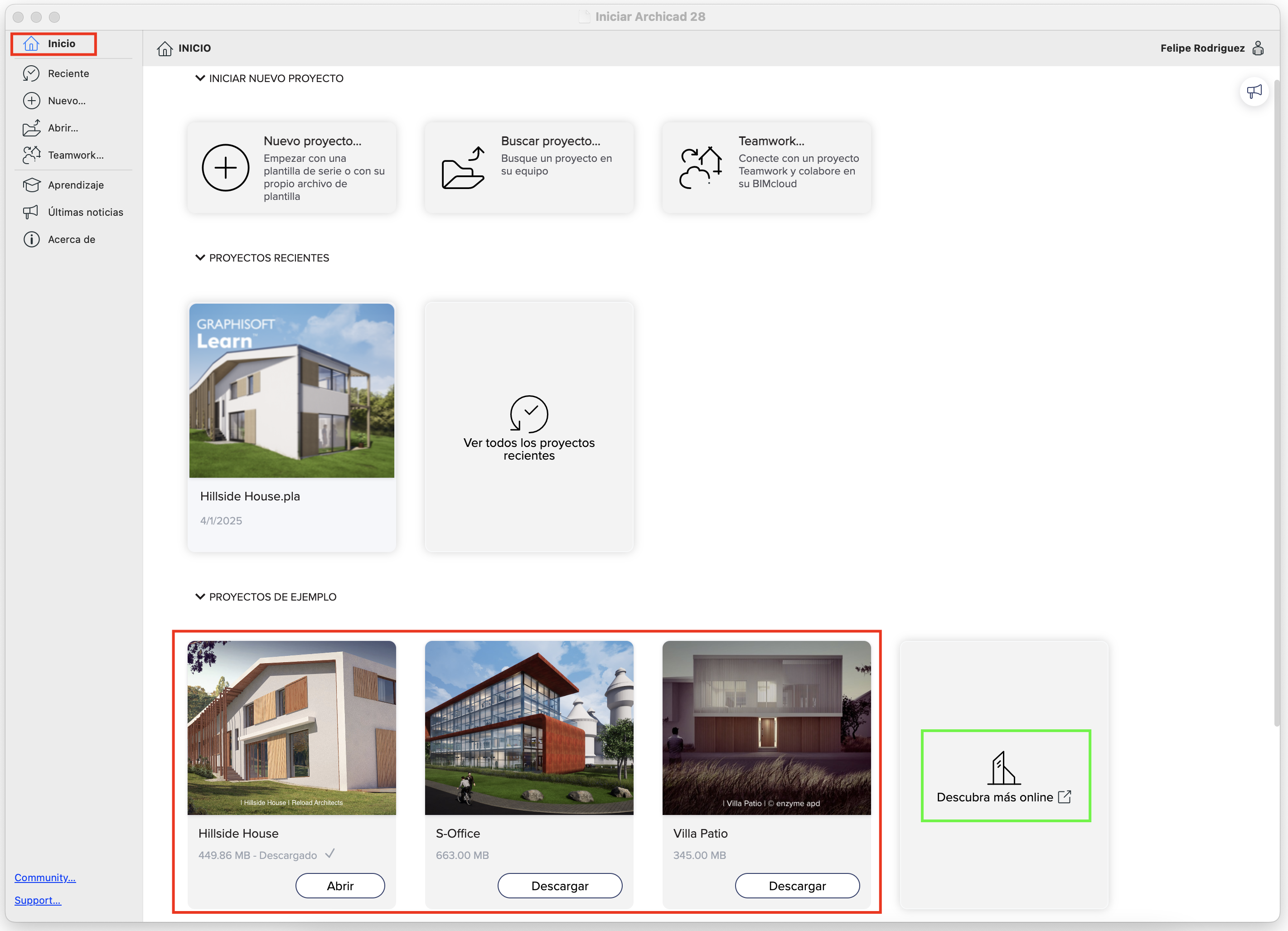
Follow these steps to access a sample project in Archicad:
- Start Archicad 28.
- On the start screen, locate the Sample Projects section.
- Select the desired sample project from the list.
- You can also select "Discover more online" to access additional sample projects.
- Click Download and/or Open to load the sample project in Archicad.
For versions prior to Archicad 28, visit the following link to download all available sample projects:
https://community.graphisoft.com/t5/Getting-started/Archicad-Sample-Projects/ta-p/304186