
Articles in this section
- How to Uniquely Identify Hotlink Module Zones in Archicad Schedules?
- How to Set the Origin of a 3D Texture in Archicad?
- Why Do Drawings Exported to PDF in Archicad Generate Very Large Files?
- How to Map a Custom Archicad Property to an IFC Property?
- How to Remove an Archicad Educational Licence from a Computer?
- How to Change an Archicad File Started in the International Version to the Spanish Version?
- How to Import a PDF to Use as a Reference in Archicad?
- How to Use Educational and Commercial Versions of Archicad on the Same Computer?
- How to Get the Archicad Connection with Twinmotion?
- How to Create a Structural Frame with the Create Truss Tool in Archicad?
How to Get the Archicad Connection with Twinmotion?
Twinmotion offers an official plugin for Archicad that establishes a direct connection between the two platforms, making it easy to synchronise models in real time for rendering and architectural visualisation.
This connection is ideal for users who want to keep the BIM model consistent while producing visualisations in Twinmotion without having to export manually.
The plugin is called Datasmith Exporter for Archicad, and is available free of charge from the official Twinmotion website.
Steps to get and install the plugin
Before you start, make sure you have the latest version of Twinmotion installed on your computer. You can check this from the Epic Games Launcher, on the Twinmotion tab.
-
Go to the official download page:
🔗 https://www.twinmotion.com/en-US/plugins/archicadNote: On this same page you will find a demo video with visual instructions for installing and using the plugin with Archicad.
- Download the installer for your operating system (Windows or macOS).
- Run the installer and follow the instructions to complete the installation. The plugin will be integrated into Archicad automatically once finished.
How to start the connection from Archicad
- Open your project in Archicad.
-
Go to the
Window > Palettes > Datasmithmenu.
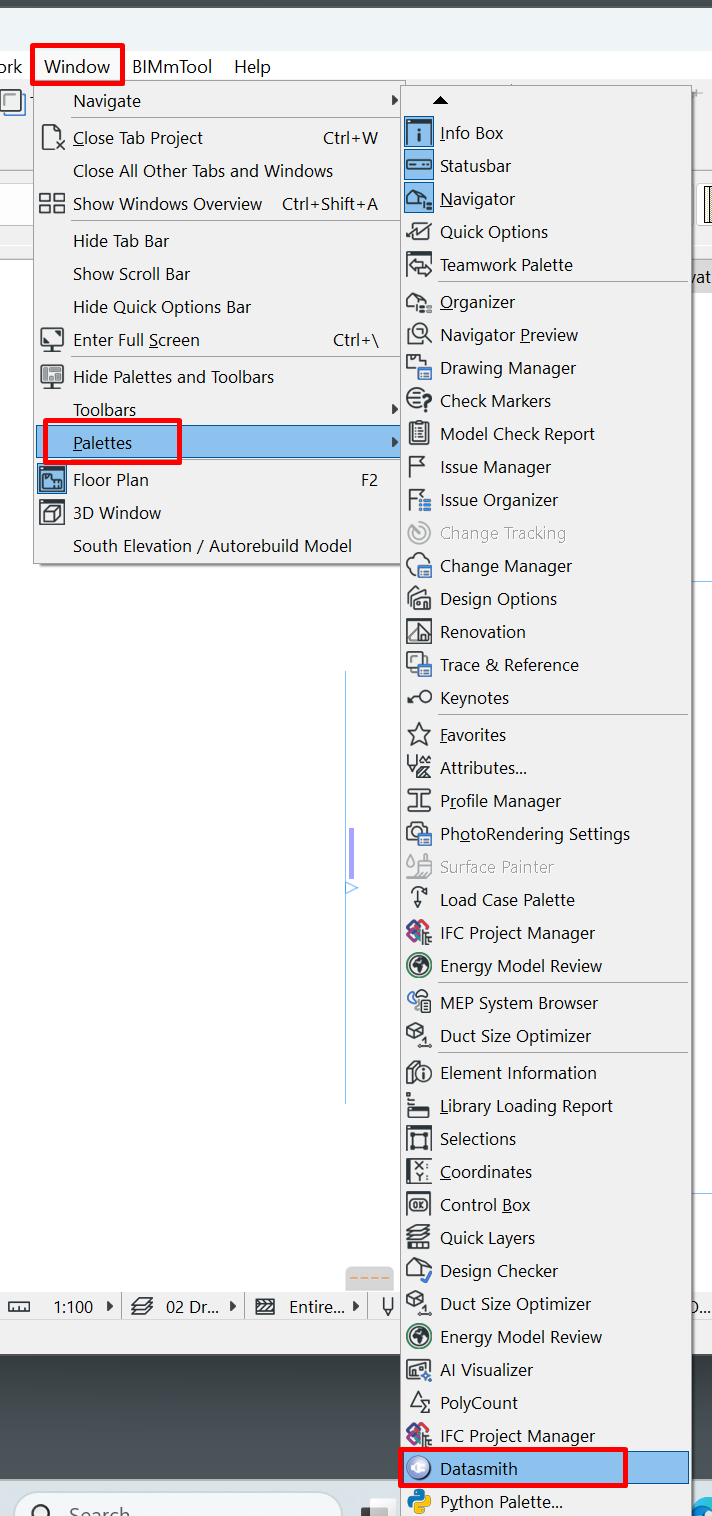
- A dialogue box will open to link your Archicad model with Twinmotion via the Datasmith plugin.
- Next, open Twinmotion and use the Import Datasmith File option to load the model into the 3D environment.
- Once imported, changes made in Archicad can be synchronised to Twinmotion in real time as long as the connection stays active.
Related articles
- How to Uniquely Identify Hotlink Module Zones in Archicad Schedules?
- How to Set the Origin of a 3D Texture in Archicad?
- Why Do Drawings Exported to PDF in Archicad Generate Very Large Files?
- How to Map a Custom Archicad Property to an IFC Property?
- How to Remove an Archicad Educational Licence from a Computer?