
Articles in this section
- How to Create an Archicad Template and What It Should Contain?
- How to Reallocate Bluebeam Subscriptions Between Accounts?
- How to Subscribe to Software with SIMBIM
- Archicad Files Don't Show the Correct Icon on Windows
- Why Can't I Assign a Licence If the User Shows Up as a Guest?
- How to Reset Your Bluebeam ID (BBID) Password?
- How to Transfer Markups to Another Document?
- How to Manage My Bluebeam Subscriptions?
- How to Change the Administrator of a Graphisoft ID Company?
- How to Use Bluebeam Revu on Mac Computers?
How to Prepare, Save and Send the Project as an Archicad PLA Project File for Technical Support?
Reading time: 2 min.
Some technical queries require our technicians to investigate the case in more depth than SIMBIM's communication channels can support. For this reason, providing a full copy of the Archicad Project File (.PLA), with all details, helps our technicians get a more detailed view of the issue, and use other means and techniques only available to them.
Step-by-Step Guide
-
Prepare the File:
- Check that all Views relevant to the case in the Project Navigator's View Map have the correct settings, such as:
- Layer Combination
- Scale
- Structure Display
- Pen Set
- Model View Options
- Graphic Override
- Renovation Filter
- Design Options
- Floor Plan Cut Plane Definitions...
- Check that all Views relevant to the case in the Project Navigator's View Map have the correct settings, such as:
-
Go to File > Save As...:
- Go to the File menu and select Save As...
- In the Save Project dialog box, enter the file name to save, and choose an easily accessible location.
- Click Options...
- The File Options dialog box should have the following settings
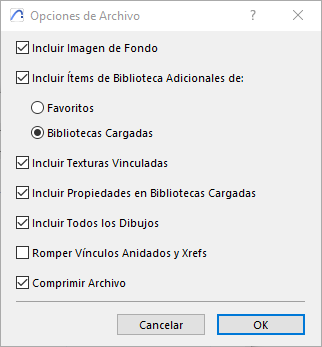
- Click Save.
-
Sending the PLA File:
- PLA files with the suggested settings are usually larger than SIMBIM's communication channels can handle. For this reason, it's best to use a repository such as Google Drive, Dropbox or similar to send PLA files.
- Once you've finished uploading the PLA file to the file repository, copy the file link and send it by email or through SIMBIM's communication channel.
Additional Tips
- Make sure the PLA file in the file repository has the privileges or permissions needed for our technical team to download it without issues.
By following these steps and incorporating these tips, you can successfully save your project as an Archicad Project File (.PLA) and send it to our technical team, so they can resolve your questions as quickly and efficiently as possible.