
Articles in this section
- How to Uniquely Identify Hotlink Module Zones in Archicad Schedules?
- How to Set the Origin of a 3D Texture in Archicad?
- Why Do Drawings Exported to PDF in Archicad Generate Very Large Files?
- How to Map a Custom Archicad Property to an IFC Property?
- How to Remove an Archicad Educational Licence from a Computer?
- How to Change an Archicad File Started in the International Version to the Spanish Version?
- How to Import a PDF to Use as a Reference in Archicad?
- How to Use Educational and Commercial Versions of Archicad on the Same Computer?
- How to Get the Archicad Connection with Twinmotion?
- How to Create a Structural Frame with the Create Truss Tool in Archicad?
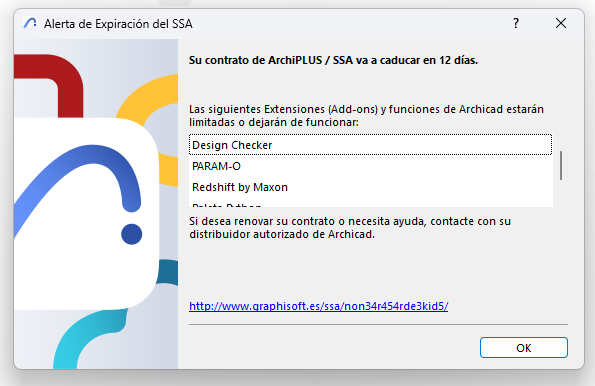
Archicad SSA Agreement Expiration Message
When starting or using your Graphisoft software, you may see a message indicating that the SSA has expired. This notice can be confusing, especially if your licence is active and in good standing.
Why does this happen?
This message is related to an old component of Graphisoft's maintenance system, known as SSA (Software Services Agreement) service mode, which is no longer in use. It therefore does not reflect the current status of your licence or subscription.
What should you do?
You can safely ignore this message. It is a harmless error that does not affect how your software works or your usage rights.
Graphisoft has discontinued the SSA model, and no action is required on your part.
Need help?
If you have any questions or would like to confirm the status of your licence, please don't hesitate to contact our support team. We'll be happy to help.
Related articles
- How to Uniquely Identify Hotlink Module Zones in Archicad Schedules?
- How to Set the Origin of a 3D Texture in Archicad?
- Why Do Drawings Exported to PDF in Archicad Generate Very Large Files?
- How to Map a Custom Archicad Property to an IFC Property?
- How to Remove an Archicad Educational Licence from a Computer?