
Articles in this section
- How to Uniquely Identify Hotlink Module Zones in Archicad Schedules?
- How to Set the Origin of a 3D Texture in Archicad?
- Why Do Drawings Exported to PDF in Archicad Generate Very Large Files?
- How to Map a Custom Archicad Property to an IFC Property?
- How to Remove an Archicad Educational Licence from a Computer?
- How to Change an Archicad File Started in the International Version to the Spanish Version?
- How to Import a PDF to Use as a Reference in Archicad?
- How to Use Educational and Commercial Versions of Archicad on the Same Computer?
- How to Get the Archicad Connection with Twinmotion?
- How to Create a Structural Frame with the Create Truss Tool in Archicad?
How to Access the AI Assistant in Archicad 29?
The AI Assistant in Archicad 29 is a tool designed to help you work more fluidly, resolve technical questions and automate routine tasks. You can open it easily from several points in the interface.
How to open the AI Assistant
Option 1 — Action button (bottom-right corner)
- Click the action button located in the bottom-right corner of Archicad 29.
- The AI Assistant palette will open immediately on the right-hand side.
Option 2 — From the Help menu
- Go to Help → AI Assistant.
-
This will display the assistant's palette on screen.
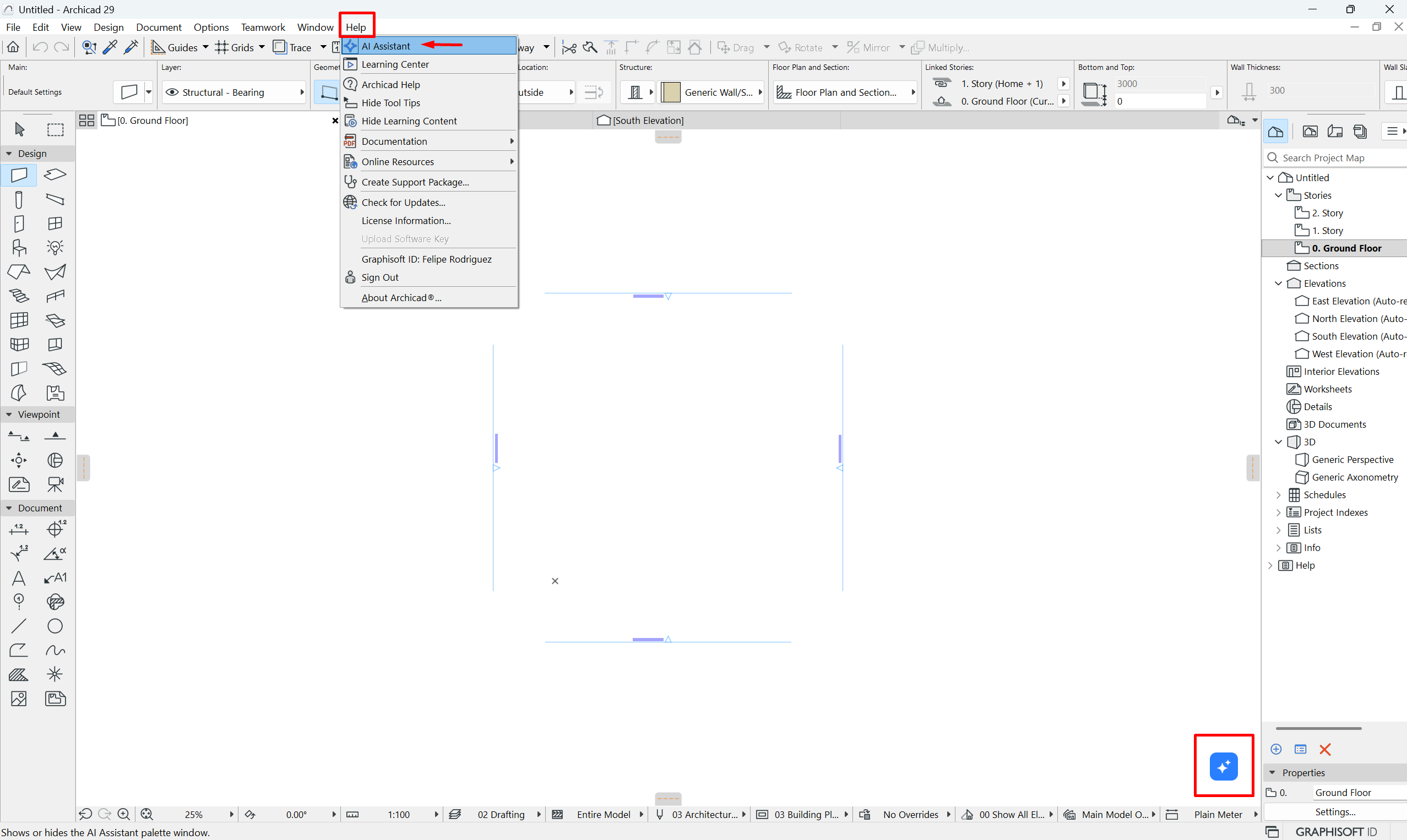
Option 3 — From the Palettes menu
- Open the assistant from Window → Palettes → AI Assistant.
- This option is useful if the palette is not visible or you have customised your workspace.
If the AI Assistant does not appear
Check that you are logged in with your Graphisoft ID and that this user has an active cloud licence assigned.
How to start using it
- Type your query or select a suggestion from the panel.
- The AI Assistant will generate recommendations based on your question.
- On some tools you will see ✦ icons that let you use assistant features directly within your workflow.
Related articles
- How to Uniquely Identify Hotlink Module Zones in Archicad Schedules?
- How to Set the Origin of a 3D Texture in Archicad?
- Why Do Drawings Exported to PDF in Archicad Generate Very Large Files?
- How to Map a Custom Archicad Property to an IFC Property?
- How to Remove an Archicad Educational Licence from a Computer?