
Articles in this section
- How to Uniquely Identify Hotlink Module Zones in Archicad Schedules?
- How to Set the Origin of a 3D Texture in Archicad?
- Why Do Drawings Exported to PDF in Archicad Generate Very Large Files?
- How to Map a Custom Archicad Property to an IFC Property?
- How to Remove an Archicad Educational Licence from a Computer?
- How to Change an Archicad File Started in the International Version to the Spanish Version?
- How to Import a PDF to Use as a Reference in Archicad?
- How to Use Educational and Commercial Versions of Archicad on the Same Computer?
- How to Get the Archicad Connection with Twinmotion?
- How to Create a Structural Frame with the Create Truss Tool in Archicad?
How to Change the Slope of a Pipe in Archicad?
When drawing pipes in Archicad, you may find that when trying to set a slope (for example 1.5–2%), the corresponding field appears greyed out and does not allow you to enter a value.
Cause: The slope parameter is locked via the padlock icon, so it cannot be modified while routing.
How to set the slope while drawing the pipe
- Activate the Pipe tool.
- Start drawing the pipe in the model.
- Press the TAB key to activate the Tracker.
- In the Tracker, locate the Slope field.
- If the value appears greyed out, click the padlock icon next to the field.
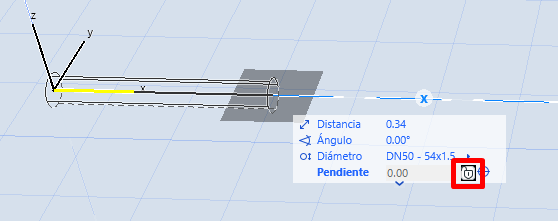
- Once unlocked, enter the desired slope (for example 1.5–2%).
- Continue routing the pipe: the element will be created with the defined slope.
Result
After unlocking the parameter in the Tracker, you will be able to set the slope directly while routing the pipe, allowing you to create collectors with the required inclination from the start.
Related articles
- How to Uniquely Identify Hotlink Module Zones in Archicad Schedules?
- How to Set the Origin of a 3D Texture in Archicad?
- Why Do Drawings Exported to PDF in Archicad Generate Very Large Files?
- How to Map a Custom Archicad Property to an IFC Property?
- How to Remove an Archicad Educational Licence from a Computer?