
Articles in this section
- How to Uniquely Identify Hotlink Module Zones in Archicad Schedules?
- How to Set the Origin of a 3D Texture in Archicad?
- Why Do Drawings Exported to PDF in Archicad Generate Very Large Files?
- How to Map a Custom Archicad Property to an IFC Property?
- How to Remove an Archicad Educational Licence from a Computer?
- How to Change an Archicad File Started in the International Version to the Spanish Version?
- How to Import a PDF to Use as a Reference in Archicad?
- How to Use Educational and Commercial Versions of Archicad on the Same Computer?
- How to Get the Archicad Connection with Twinmotion?
- How to Create a Structural Frame with the Create Truss Tool in Archicad?
How to Count Elements by Units Instead of Values in an Interactive Schedule in Archicad?
Reading time: 4 min.
In many architecture and construction projects, users need to count the number of elements (such as zones, furniture, light fixtures, etc.) by type or classification. To do this, custom Properties are created and then included in Interactive Schedules. However, when these numeric properties are included, Archicad can sum the values by default instead of counting the units. This article explains how to configure a schedule so that it counts elements rather than summing values.
Audience
Archicad users who use Interactive Schedules to generate element listings and need to count units instead of accumulating numeric values.
Prerequisites
Have a Property defined and assigned to an element category (for example, Zones, Objects, Walls).
Have an Interactive Schedule configured that includes that property.
Archicad 25 or later (Archicad 28 recommended for improved functionality).
Resolution Steps:
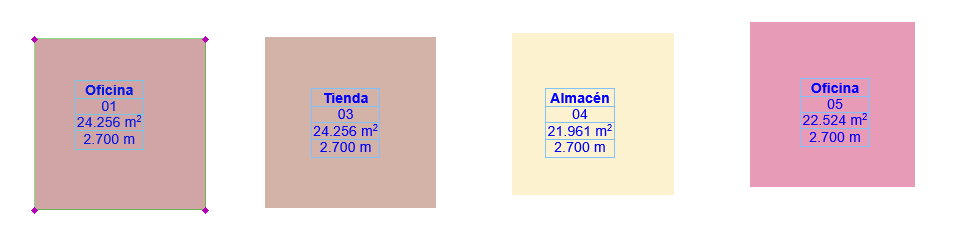
- Open the project in Archicad (see example — 4 different zones were defined, and two of them were assigned the same property).
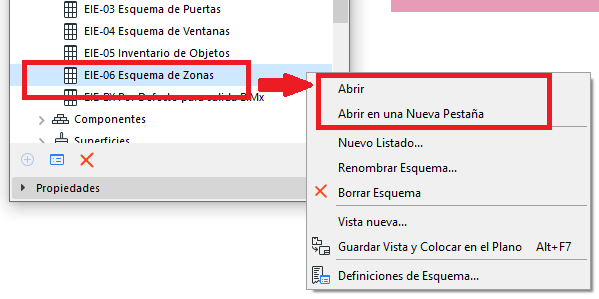
- Open the project's Navigator palette: Window > Palettes > Navigator.
- Right-click the Schedule, and select Open or Open in a New Tab.
- The Scheme Settings dialog box will open, showing the Property we created with its pre-configured values (see example photo).
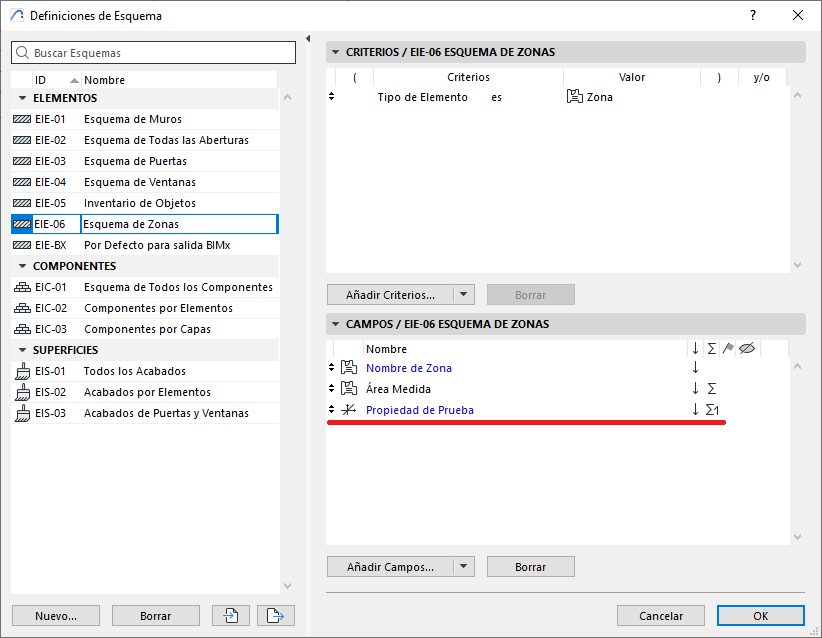
- In the Interactive Schedule above, in the "Σ" column and the row for the property we created, click repeatedly until the Show Quantity icon "Σ1" appears
- Save the Schedule by clicking OK.
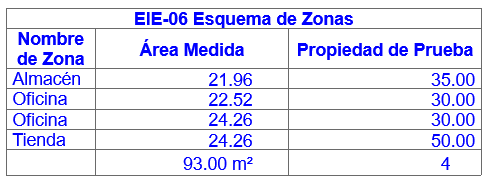
- You will then see a schedule similar to the following, where:
- "Measured Area" shows the sum "Σ" of the surface values of the Zone elements.
- "Test Property" shows the Quantity "Σ1" of the Zone elements.
Result Validation:
- Check that the total value at the bottom of the column matches the number of elements listed.
- Make sure numeric sums are no longer shown, especially if the property contained repeated values such as "1".
Example file:
You can download a sample project file where an Interactive Schedule has been correctly configured with a custom property that counts elements by units:
How to count elements in an Interactive Schedule by units and not by values.pln
Tip for Consultants:
When working with properties that represent individual units or quantities, it is advisable to set the data type to Number. This makes it easier to use them in counts and prevents Archicad from applying summing rules based on physical units such as m² or m³.
Related articles
- How to Uniquely Identify Hotlink Module Zones in Archicad Schedules?
- How to Set the Origin of a 3D Texture in Archicad?
- Why Do Drawings Exported to PDF in Archicad Generate Very Large Files?
- How to Map a Custom Archicad Property to an IFC Property?
- How to Remove an Archicad Educational Licence from a Computer?