
Articles in this section
- How to Uniquely Identify Hotlink Module Zones in Archicad Schedules?
- How to Set the Origin of a 3D Texture in Archicad?
- Why Do Drawings Exported to PDF in Archicad Generate Very Large Files?
- How to Map a Custom Archicad Property to an IFC Property?
- How to Remove an Archicad Educational Licence from a Computer?
- How to Change an Archicad File Started in the International Version to the Spanish Version?
- How to Import a PDF to Use as a Reference in Archicad?
- How to Use Educational and Commercial Versions of Archicad on the Same Computer?
- How to Get the Archicad Connection with Twinmotion?
- How to Create a Structural Frame with the Create Truss Tool in Archicad?
How to Export and Import DXF-DWG Translator Settings in Archicad?
Reading time: 3 min.
When working with DWG or DXF files in Archicad, DXF-DWG translators are essential for ensuring information transfers correctly between Archicad and other CAD programs. Exporting and importing these settings can be useful for sharing them with project collaborators or keeping a personalised backup.
What Are DXF-DWG Translators?
DXF-DWG translators are sets of settings that define how Archicad should import and export files in DXF or DWG format. They include rules for Layers, Line Types, Units, Fonts, and more.
How to Export a DXF-DWG Translation Setting?
-
Method 1: From the Archicad Interface
- Go to: File > Interoperability > DXF-DWG > DXF-DWG Translation Setup.
- In the DXF-DWG Translation Setup dialog box, select the location path of the DXF-DWG translators, shown at the bottom of the dialog box.
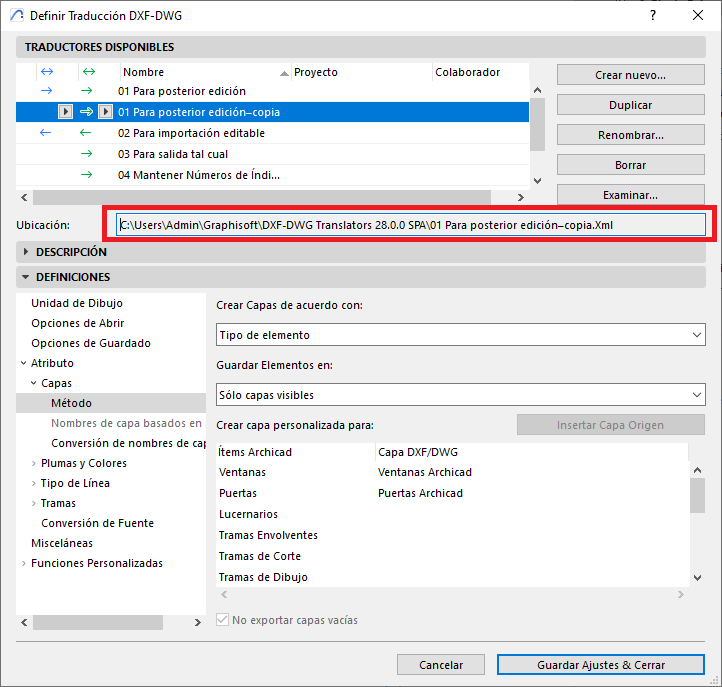
- Paste that path into your operating system's file explorer.
- Locate the .XML file with the translator's name and copy or save it wherever you'd like.
-
Method 2: From the DXF-DWG Translation Setup Dialog Box
- Go to: File > Interoperability > DXF-DWG > DXF-DWG Translation Setup.
- In the DXF-DWG Translation Setup dialog box, click Browse...
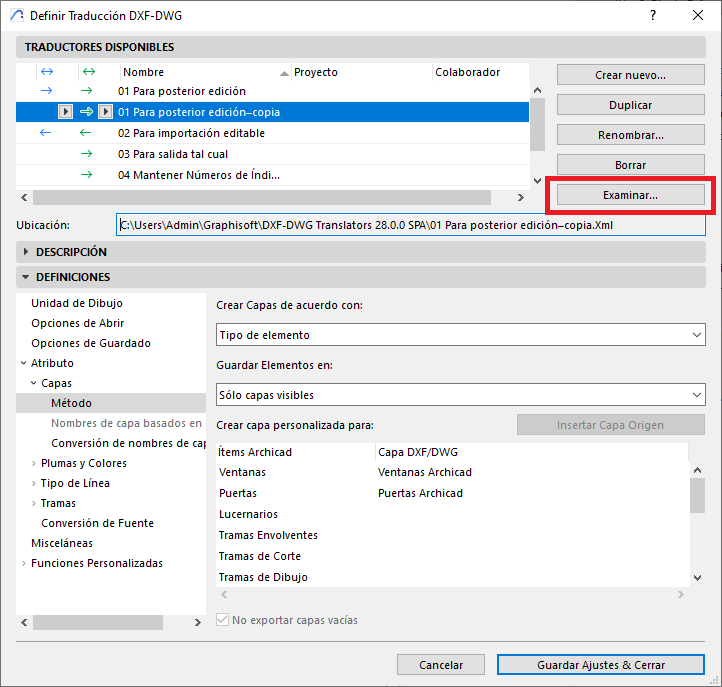
- The folder where the DXF-DWG translator setting is stored will open.
- Copy the .XML file to the location you want.
How to Import a DXF-DWG Translation Setting?
-
Go to: File > Interoperability > DXF-DWG > DXF-DWG Translation Setup.
-
Click Browse...
-
Navigate to the location where you saved the translator's .XML file.
-
Select it and click Open.
-
The translator will now appear in the list of those available in Archicad.
Important Recommendations
-
It's good practice not to modify Archicad's default translators. Instead, create a copy and work on that.
-
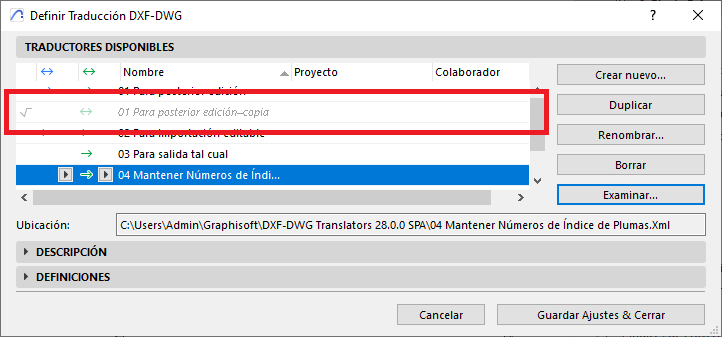
If you delete an .XML file directly from the system, Archicad will display it greyed out, indicating it's no longer available (see photo).
-
Archicad does not automatically save imported DXF-DWG translators to the default folder, so make sure to move them manually if needed.
Related articles
- How to Uniquely Identify Hotlink Module Zones in Archicad Schedules?
- How to Set the Origin of a 3D Texture in Archicad?
- Why Do Drawings Exported to PDF in Archicad Generate Very Large Files?
- How to Map a Custom Archicad Property to an IFC Property?
- How to Remove an Archicad Educational Licence from a Computer?