
Articles in this section
- How to Uniquely Identify Hotlink Module Zones in Archicad Schedules?
- How to Set the Origin of a 3D Texture in Archicad?
- Why Do Drawings Exported to PDF in Archicad Generate Very Large Files?
- How to Map a Custom Archicad Property to an IFC Property?
- How to Remove an Archicad Educational Licence from a Computer?
- How to Change an Archicad File Started in the International Version to the Spanish Version?
- How to Import a PDF to Use as a Reference in Archicad?
- How to Use Educational and Commercial Versions of Archicad on the Same Computer?
- How to Get the Archicad Connection with Twinmotion?
- How to Create a Structural Frame with the Create Truss Tool in Archicad?
How to Fix BIMcloud or Teamwork Connection Problems in Archicad?
If you are experiencing connection problems with BIMcloud while using Archicad, follow these steps to try to resolve the issue:
1. Check your internet connection
Make sure your device is connected to the internet and that the network is working correctly. You can check this as follows:
- Open a web browser and visit several pages to confirm you have a connection.
- Restart your router or switch to another network if possible.
- Check that your antivirus or firewall is not blocking Archicad or BIMcloud.
2. Sign out and sign back in
If your internet connection is stable but the problem continues:
-
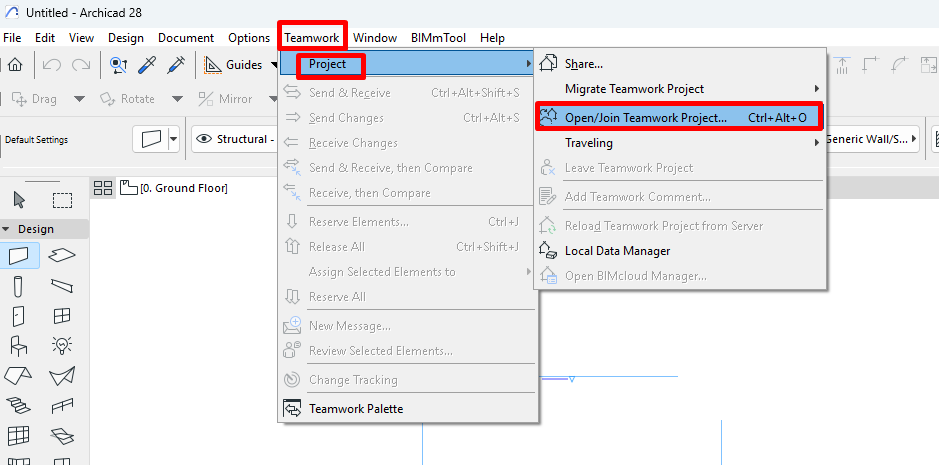
Go to the Teamwork > Project > Open/Join Teamwork Project menu
-
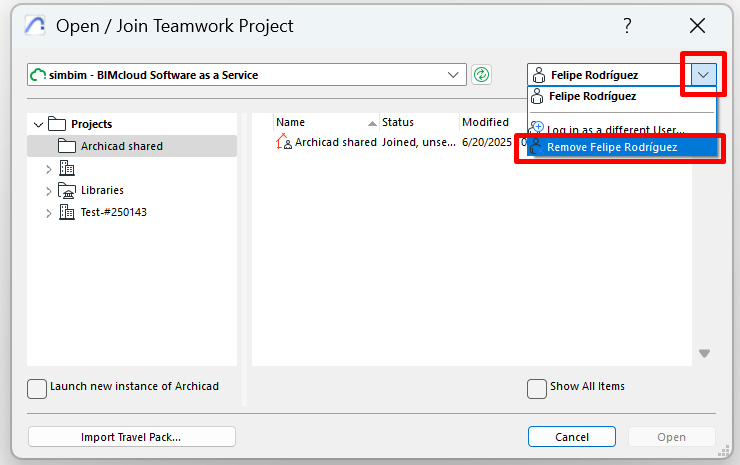
Sign out of your BIMcloud account from within Archicad.
- Sign back in to restore the connection.
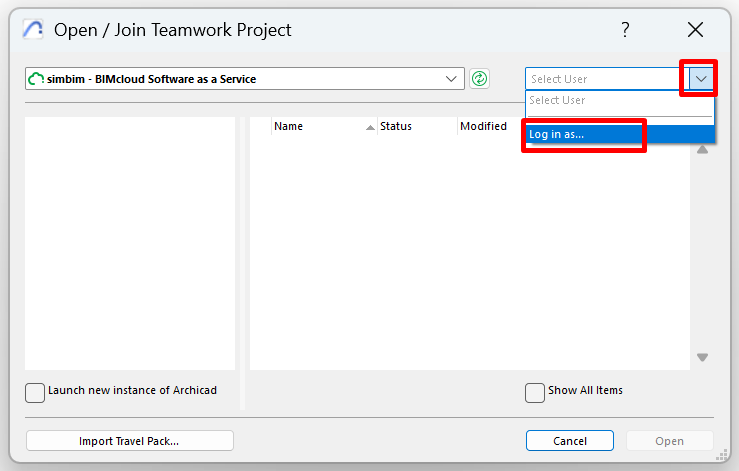
This step can help resolve temporary authentication or connection errors.
3. Contact support
If the problem persists after completing the steps above, get in touch with our support team:
- Support page: my.simbim.es
- Email: support@simbim.es
We will be happy to help you resolve any issue as soon as possible.
Related articles
- How to Uniquely Identify Hotlink Module Zones in Archicad Schedules?
- How to Set the Origin of a 3D Texture in Archicad?
- Why Do Drawings Exported to PDF in Archicad Generate Very Large Files?
- How to Map a Custom Archicad Property to an IFC Property?
- How to Remove an Archicad Educational Licence from a Computer?