
Articles in this section
- How to Uniquely Identify Hotlink Module Zones in Archicad Schedules?
- How to Set the Origin of a 3D Texture in Archicad?
- Why Do Drawings Exported to PDF in Archicad Generate Very Large Files?
- How to Map a Custom Archicad Property to an IFC Property?
- How to Remove an Archicad Educational Licence from a Computer?
- How to Change an Archicad File Started in the International Version to the Spanish Version?
- How to Import a PDF to Use as a Reference in Archicad?
- How to Use Educational and Commercial Versions of Archicad on the Same Computer?
- How to Get the Archicad Connection with Twinmotion?
- How to Create a Structural Frame with the Create Truss Tool in Archicad?
How to Prepare and Send a Support Package for Technical Support?
Reading time: 2 min.
When you experience a technical problem in Archicad or BIMcloud, the support team may ask you for a Support Package. This package contains essential information to diagnose and resolve the problem effectively.
What Is a Support Package?
A Support Package is a compressed file that automatically collects relevant system data, activity logs, project files and other useful technical information. It can be generated for both individual projects and collaborative (Teamwork) projects.
Steps to Create a Support Package in Archicad
- Open the project in which you're experiencing the problem.
- Reproduce the problem you're experiencing.
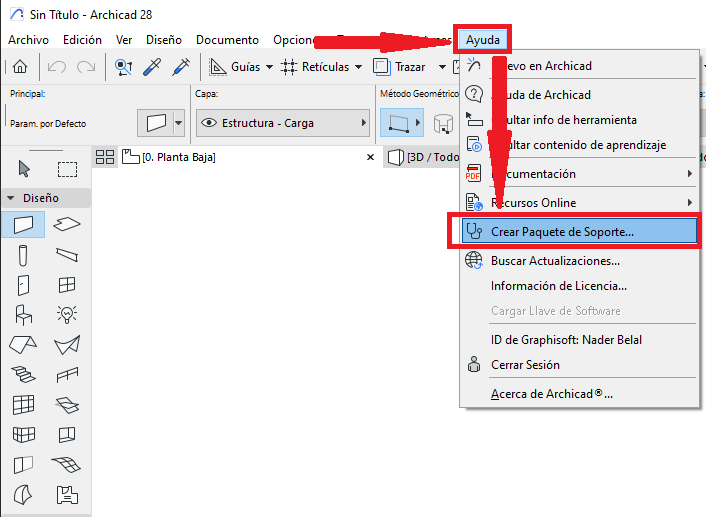
- In Archicad, go to the Help menu > Create Support Package.
- In the Create Support Package dialog box, select the affected project.
Solo Project (red): to send the project open in the same Archicad instance.
Teamwork Project (yellow): to send a Teamwork project open in the same Archicad instance.
Project (green): to select a different project than the one open in the same Archicad instance.
Package Content (blue): to select whether to include the project's libraries and/or reports.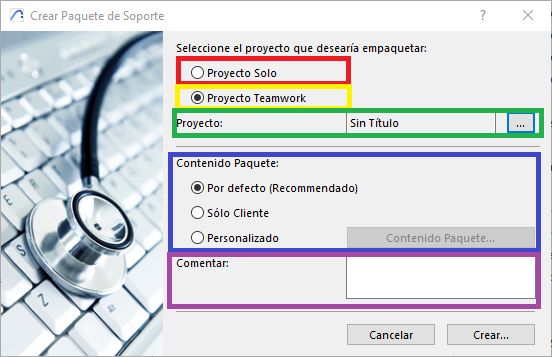
- Add a detailed description of the problem in the Comment field (purple).
- Click Create and save the generated file to your computer.
- The generated files are often larger than communication channels can handle. Because of this, it's best to use repositories such as Google Drive, Dropbox or similar to send the files.
- Once you've finished uploading the files to the repository, copy the file's link and send it by email or through SIMBIM's communication channel.
Important Note
If the file exceeds 100 MB, Archicad will automatically split it into several parts.
What Does the Support Package Contain?
- Project files (.pln or .twsupport)
- Client and/or server activity logs
- FastLogger files (detailed information about system usage)
- BIMcloud diagnostic data (if applicable)
- Operating system information and Archicad configuration
Frequently Asked Questions (FAQ)
Can I create a Support Package if Archicad closes unexpectedly?
Yes. You can manually access the logs and FastLogger files from the system folders, and attach the project file (.pln) along with a description of the problem.
What personal information is included in the Support Package?
It may include:
- System username
- Local IP address
- Computer name
- Archicad installation path
For this reason, we recommend reviewing the project's content before sending it if you're working with sensitive data.
Related articles
- How to Uniquely Identify Hotlink Module Zones in Archicad Schedules?
- How to Set the Origin of a 3D Texture in Archicad?
- Why Do Drawings Exported to PDF in Archicad Generate Very Large Files?
- How to Map a Custom Archicad Property to an IFC Property?
- How to Remove an Archicad Educational Licence from a Computer?