
Articles in this section
- How to Uniquely Identify Hotlink Module Zones in Archicad Schedules?
- How to Set the Origin of a 3D Texture in Archicad?
- Why Do Drawings Exported to PDF in Archicad Generate Very Large Files?
- How to Map a Custom Archicad Property to an IFC Property?
- How to Remove an Archicad Educational Licence from a Computer?
- How to Change an Archicad File Started in the International Version to the Spanish Version?
- How to Import a PDF to Use as a Reference in Archicad?
- How to Use Educational and Commercial Versions of Archicad on the Same Computer?
- How to Get the Archicad Connection with Twinmotion?
- How to Create a Structural Frame with the Create Truss Tool in Archicad?
How to Resolve the “Cineware by Maxon Plugin Has Quit Unexpectedly” Error in Archicad?
Issue
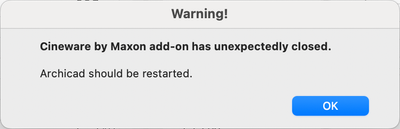
When trying to render an image with Cineware or modify surface settings using the Cineware rendering engine, Archicad shows the following error message:
“The Cineware by Maxon plugin has quit unexpectedly.”
Temporary Solution (Workaround)
-
Replace the Cineware folder
- Download the working Cineware folder from the link below and replace the existing one in your installation:
/Applications/Graphisoft/<Archicad version>/CinewareOnce replaced, open Archicad and try rendering again.
-
If the problem persists
- Go to the same path and delete the “plugins” folder inside the Cineware folder:
/Applications/Graphisoft/<Archicad version>/Cineware/pluginsThen restart your computer, launch Archicad and try rendering again.
Note: Deleting the plugins folder disables the ability to render with Redshift, since this engine depends on the plugins included in that folder.
Permanent Solution
The permanent fix is planned for Archicad 30.
Graphisoft is evaluating the possibility of applying it to earlier versions, although this is not yet confirmed.
Related articles
- How to Uniquely Identify Hotlink Module Zones in Archicad Schedules?
- How to Set the Origin of a 3D Texture in Archicad?
- Why Do Drawings Exported to PDF in Archicad Generate Very Large Files?
- How to Map a Custom Archicad Property to an IFC Property?
- How to Remove an Archicad Educational Licence from a Computer?