
Articles in this section
- How to Uniquely Identify Hotlink Module Zones in Archicad Schedules?
- How to Set the Origin of a 3D Texture in Archicad?
- Why Do Drawings Exported to PDF in Archicad Generate Very Large Files?
- How to Map a Custom Archicad Property to an IFC Property?
- How to Remove an Archicad Educational Licence from a Computer?
- How to Change an Archicad File Started in the International Version to the Spanish Version?
- How to Import a PDF to Use as a Reference in Archicad?
- How to Use Educational and Commercial Versions of Archicad on the Same Computer?
- How to Get the Archicad Connection with Twinmotion?
- How to Create a Structural Frame with the Create Truss Tool in Archicad?
How to Revert an Archicad Teamwork Project to a Previous Version?
To revert an Archicad Teamwork project to a previous version, there are two safe, supported methods, depending on whether the project has snapshots in BIMcloud or a previous PLN copy.
Option 1 – Restore a Snapshot from BIMcloud
This method lets you return the Teamwork project to a previous state stored automatically or manually on the BIMcloud server.
- Go to BIMcloud Manager from the browser or the application.
- Go to Projects and select the affected Teamwork project.
- Open the Snapshots section.
- Select the desired snapshot by date and time.
-
Click Restore.
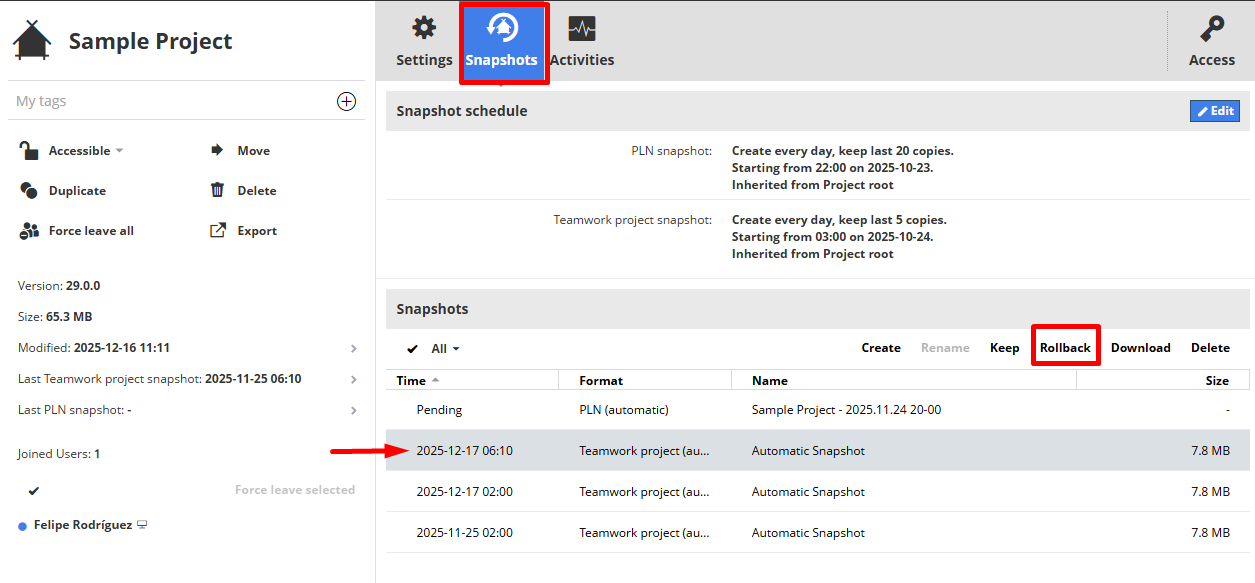
Note: When you restore a snapshot, the project is returned exactly to that state and all changes made afterwards are deleted. Users will need to rejoin the project.
Option 2 – Recover a PLN File and Re-share the Project
If there is no valid snapshot, or a previous stable copy is available, the project can be recovered from a PLN file.
- Locate the PLN file for the desired version.
- Open it in Archicad using the same version of the software.
- Check that the project's content is correct.
- Go to Teamwork → Share Project.
- Publish the project again to BIMcloud.
Note: This process creates a new Teamwork project. The previous project's history is not kept, so it is recommended to archive or rename the original project before sharing the new one.
Recommended best practices
- Enable frequent automatic snapshots in BIMcloud.
- Create manual snapshots before important milestones.
- Save periodic PLN copies of the project.
- Limit critical operations to users responsible for the project.
Related articles
- How to Uniquely Identify Hotlink Module Zones in Archicad Schedules?
- How to Set the Origin of a 3D Texture in Archicad?
- Why Do Drawings Exported to PDF in Archicad Generate Very Large Files?
- How to Map a Custom Archicad Property to an IFC Property?
- How to Remove an Archicad Educational Licence from a Computer?