
Articles in this section
- How to Uniquely Identify Hotlink Module Zones in Archicad Schedules?
- How to Set the Origin of a 3D Texture in Archicad?
- Why Do Drawings Exported to PDF in Archicad Generate Very Large Files?
- How to Map a Custom Archicad Property to an IFC Property?
- How to Remove an Archicad Educational Licence from a Computer?
- How to Change an Archicad File Started in the International Version to the Spanish Version?
- How to Import a PDF to Use as a Reference in Archicad?
- How to Use Educational and Commercial Versions of Archicad on the Same Computer?
- How to Get the Archicad Connection with Twinmotion?
- How to Create a Structural Frame with the Create Truss Tool in Archicad?
What Is the Archicad Issue Manager?
Reading time: 5 min.
While developing a BIM project, teams often identify observations, issues or decisions that need to be recorded without directly affecting the official documentation. Archicad's Issue Manager lets you manage these observations in a structured way within the modelling environment.
Audience
- Archicad users with a basic or intermediate level
- Modelling teams in collaborative environments
- BIM coordinators and review technicians
Prerequisites
- Archicad 24 or later installed
- An open project where issues can be viewed and managed
Technical resolution
The Issue Manager is a floating palette in Archicad that lets you work with an open issue. An issue is an annotation linked to elements in the model, which can include comments, images, change proposals and status tracking.
Main functions
| Function | Description |
|---|---|
| Comments | Add text-based observations. |
| Associated views | Attach relevant 2D or 3D views. |
| Affected elements | Show and classify the elements involved. |
| Change proposal | Suggest modifications to the elements. |
| Accept or reject | Accept or discard change suggestions. |
Access
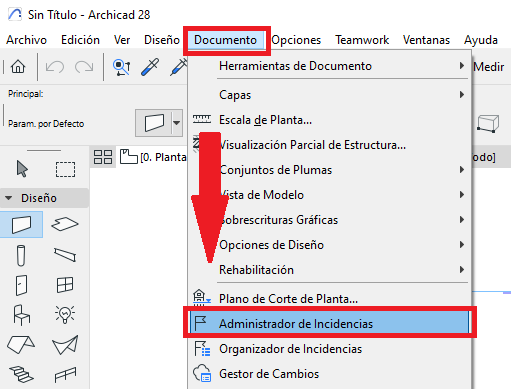
- Menu: Document > Issue Manager
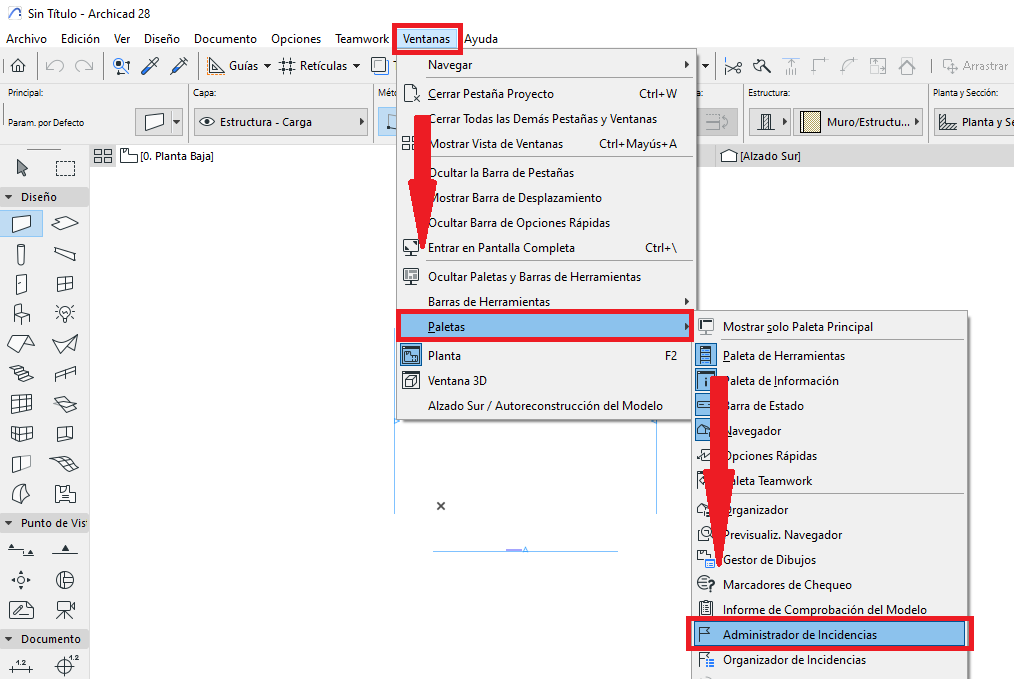
- Palette: Window > Palettes > Issue Manager
- It is also activated automatically when you create an issue
Common uses
Recording internal observations
Managing reviews of model elements
Assigning issues among team members
Documenting technical decisions
Maintaining traceability without altering the layouts
Best practices
Create one issue per specific observation or problem to make it easier to track.
Always add an associated view so the context of the problem is clear.
Correctly classify elements as New, Modified, Deleted or Highlighted.
Use precise, objective comments to avoid ambiguity.
Assign the issue to a responsible person when working in collaborative environments (Teamwork).
Avoid duplicating issues about the same problem.
Review and close resolved issues to keep the project clean and organised.
Validation
The palette should show an active issue
It should allow you to add comments and views
Selecting a listed element should highlight it in the model
The accept or reject change actions should be available if there are active proposals
Implementation tip
Use the Issue Manager for internal observations and technical review. For formal requests that impact the project documentation, we recommend using the Change Manager.
Related articles
Related articles
- How to Uniquely Identify Hotlink Module Zones in Archicad Schedules?
- How to Set the Origin of a 3D Texture in Archicad?
- Why Do Drawings Exported to PDF in Archicad Generate Very Large Files?
- How to Map a Custom Archicad Property to an IFC Property?
- How to Remove an Archicad Educational Licence from a Computer?