
Articles in this section
- How to Uniquely Identify Hotlink Module Zones in Archicad Schedules?
- How to Set the Origin of a 3D Texture in Archicad?
- Why Do Drawings Exported to PDF in Archicad Generate Very Large Files?
- How to Map a Custom Archicad Property to an IFC Property?
- How to Remove an Archicad Educational Licence from a Computer?
- How to Change an Archicad File Started in the International Version to the Spanish Version?
- How to Import a PDF to Use as a Reference in Archicad?
- How to Use Educational and Commercial Versions of Archicad on the Same Computer?
- How to Get the Archicad Connection with Twinmotion?
- How to Create a Structural Frame with the Create Truss Tool in Archicad?
What Should I Do If Teamwork or BIMcloud Fails as a User?
Reading time: 2 min.
Archicad Teamwork is Graphisoft's tool that lets you take things to the next level, offering the ability to work on projects collaboratively among the different people involved in the project. In essence, Archicad Teamwork integrates all the available technologies to give you tools that make collaboration smoother, easier and more effective. You can learn more about this by reading the following article:
- BIMcloud Basics - The Concept of Teamwork – My SIMBIM Centre
But in some cases, synchronisation between the various elements, technologies and tools that make up Archicad Teamwork can fail, and although Archicad Teamwork is designed to prevent data loss, incorrect handling of the tool can cause irreparable loss of the project.
Steps to resolve a Teamwork or BIMcloud failure
-
Prevent loss of the project
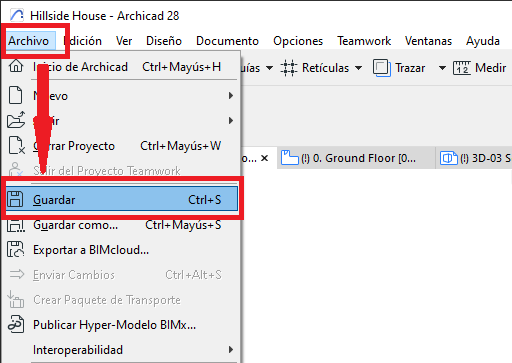
Although Teamwork has procedures in place to prevent loss of the project's information, the nature of the failure experienced may prevent these procedures from kicking in. For this reason, it is essential to save a local backup (emergency) copy of the project, following these steps:- Go to File > Save
- Select the file's name and location on your PC.
-
Contact SIMBIM
Once you have saved the project to a safe location on your computer, contact SIMBIM through the official communication channel my.simbim.es. Briefly describe the nature of your issue and, if possible, attach screenshots that include the error messages. This will allow us to offer you an effective solution as quickly as possible.
Related articles
- How to Uniquely Identify Hotlink Module Zones in Archicad Schedules?
- How to Set the Origin of a 3D Texture in Archicad?
- Why Do Drawings Exported to PDF in Archicad Generate Very Large Files?
- How to Map a Custom Archicad Property to an IFC Property?
- How to Remove an Archicad Educational Licence from a Computer?