
Articles in this section
- How to Uniquely Identify Hotlink Module Zones in Archicad Schedules?
- How to Set the Origin of a 3D Texture in Archicad?
- Why Do Drawings Exported to PDF in Archicad Generate Very Large Files?
- How to Map a Custom Archicad Property to an IFC Property?
- How to Remove an Archicad Educational Licence from a Computer?
- How to Change an Archicad File Started in the International Version to the Spanish Version?
- How to Import a PDF to Use as a Reference in Archicad?
- How to Use Educational and Commercial Versions of Archicad on the Same Computer?
- How to Get the Archicad Connection with Twinmotion?
- How to Create a Structural Frame with the Create Truss Tool in Archicad?
How to Map Element Attributes Between Archicad and DXF/DWG Files? Line Type Mapping
Reading time: 3 min.
When collaborating between CAD programs and Archicad using DXF/DWG files, it's essential to make sure the element attributes are mapped correctly between the programs for successful collaboration.
Setting up the Line Type mapping is an important part of the collaborative project, because:
- Line Types between Archicad and CAD programs can have different names, settings and scales.
- An incorrect Line Type conversion can lead to a misinterpretation of the project among the project's collaborators.
Mapping Line Types
To map Line Types from Archicad to DXF-DWG files:
- Follow the instructions in How to Map Element Attributes Between Archicad and DXF/DWG Files? DXF/DWG as a Mapping Template – My SIMBIM Centre
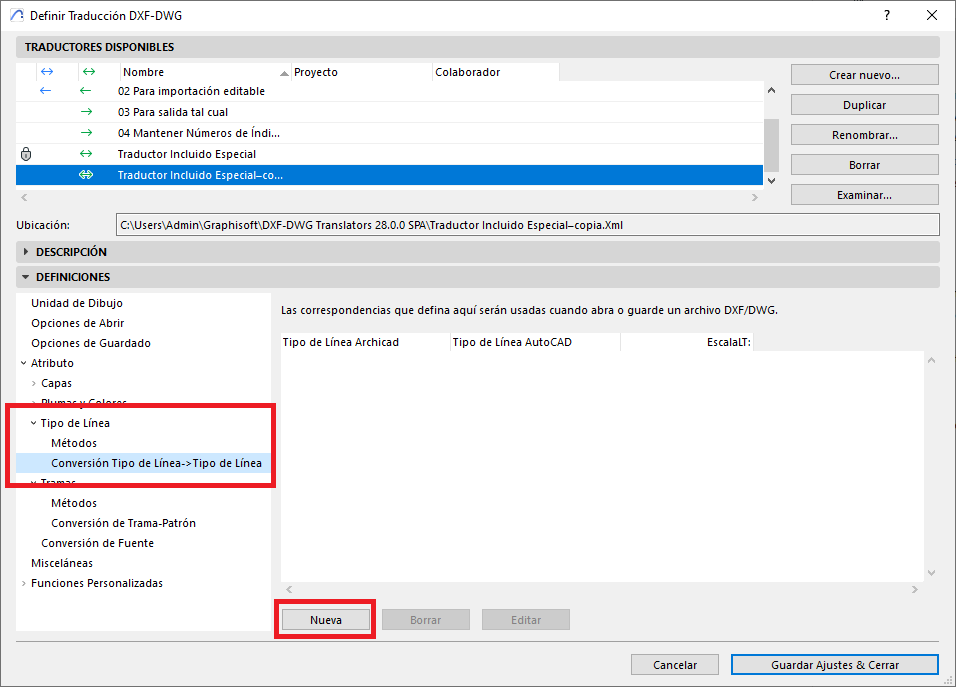
- Go to: File > Interoperability > DXF-DWG > DXF-DWG Translation Setup.
- Select the DXF-DWG translator setup to duplicate.
- In the DXF-DWG Translation Setup dialog box, go to Definitions > Attribute and click Line Type.
- Select Line Type -> Line Type Conversion.
- Click New.
- In the Edit Line Type Conversion Item dialog box, under:
Archicad Line Type (red): select the Archicad Line Type.
AutoCAD Line Type (yellow): select the corresponding AutoCAD Line Type.
LTScale (green): select the Line Type scale in AutoCAD.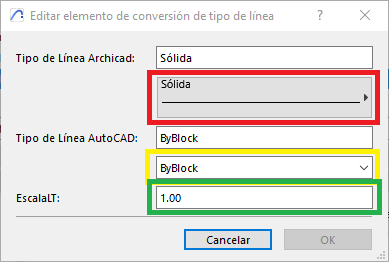
- Repeat this process for each Line Type you need to map.
- Save the setup by clicking Save Settings & Close.
Tips:
- Do not edit the original settings of the DXF-DWG Translators that come by default with the program's installation.
- Create duplicates of the customised DXF-DWG Translator settings until you achieve the desired configuration.
- Check that similar Line Types are available in both Archicad and the CAD program.
- Make sure the Line Type in the CAD program has been used (at least for one element) in the DXF-DWG file that was used as the mapping template in step 1.
By following these steps and incorporating these tips, you can set up the Line Type mapping between your Archicad project and the DXF-DWG files (imported or exported) with your project collaborators.
Related articles
- How to Uniquely Identify Hotlink Module Zones in Archicad Schedules?
- How to Set the Origin of a 3D Texture in Archicad?
- Why Do Drawings Exported to PDF in Archicad Generate Very Large Files?
- How to Map a Custom Archicad Property to an IFC Property?
- How to Remove an Archicad Educational Licence from a Computer?